
Qore.works Business development
Introduction
If you would like to develop on one or multiple Qore.works Business packages, make sure to configure your composer.json package locally to provide the correct repository location for the package and set the minimum-stability to dev.
composer.json example
{

    "minimum-stability": "dev",
    "prefer-stable": true,
    "repositories": [
        {
            "type": "path",
            "url": "../packages/qore-works-business/qore-admin-base"
        }
    ]
}
To apply the configuration above with composer and get the latest qore-admin-base version, you can run:
composer config repositories.0 path ../packages/qore-works-business/qore-admin-base
composer config minimum-stability dev
composer require qore-works-business/qore-admin-base:*
The project contains orchestra/canvas. With that, it is possible to use the default Laravel commands, for example:
composer exec canvas make:migration CreatePostsTablePublish
Migrations
php artisan vendor:publish --tag=qore-admin-base-migrationsAssets
php artisan qore-admin:publishAuto publish on update
You can change your composer.json to auto publish the assets and migrations after updating.
{
    "scripts": {
        "post-update-cmd": [
            "@php artisan vendor:publish --tag=qore-admin-base-migrations --ansi",
            "@php artisan qore-admin:publish"
        ]
    }
}
Testing
Because the packages is build for Laravel application, we need a Laravel skeleton to run proper tests. For this, we are using the package Orchestra.
Initialize
Before you can run tests, you need to initialize the installation on Orchestra for first time usage.
composer prepare-testRun tests
After initialize you can run test with the following command:
composer testCode styling inside the IDE
Inside the pipeline and git hooks we are using a default code styling with Laravel Pint. This also can be implemented inside PhpStorm.
- Activate Laravel Pint as default formatter.
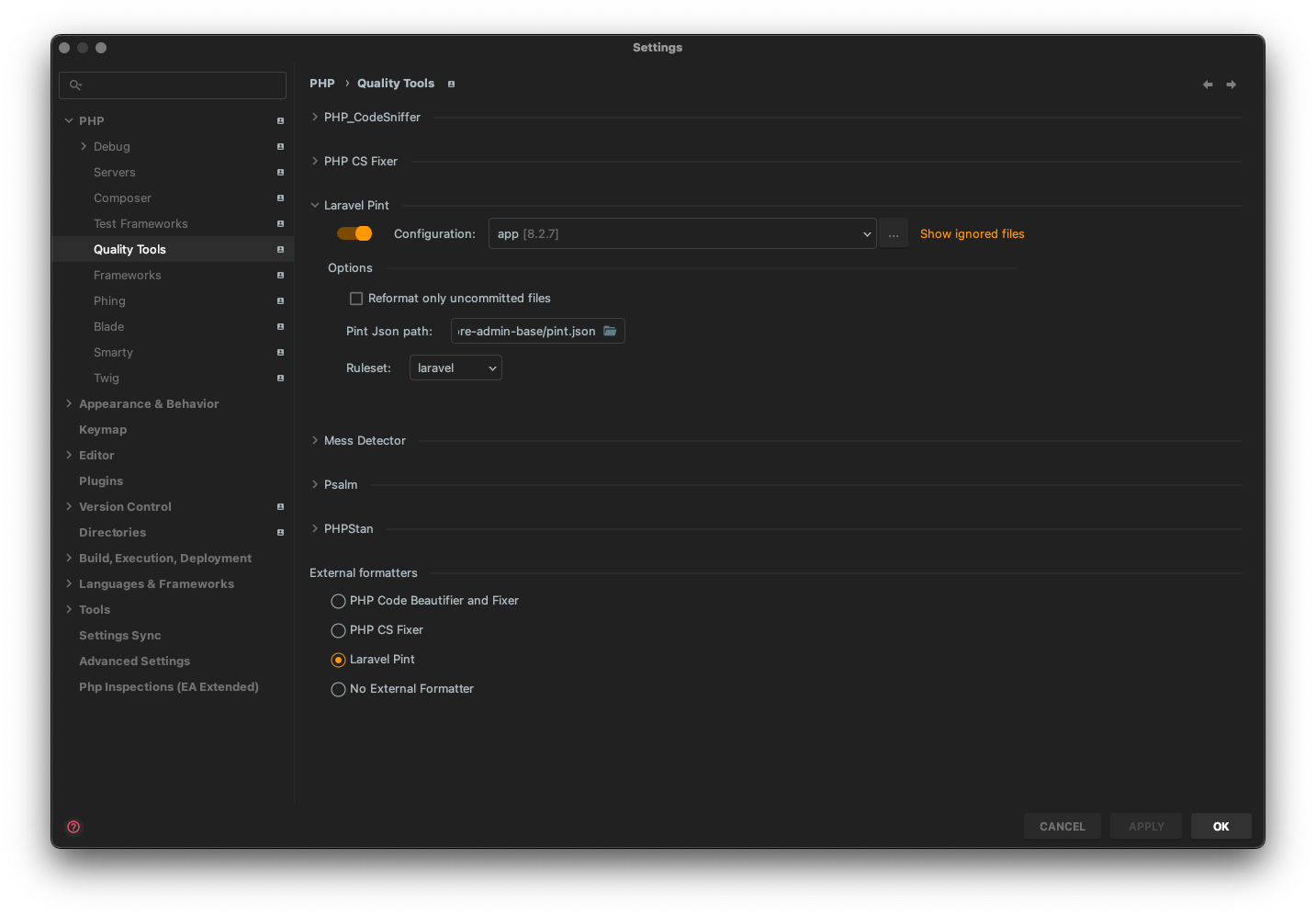
The pint json path should be:
/var/www/packages/qore-works-business/qore-admin-base/pint.json- Setup the correct interpreter
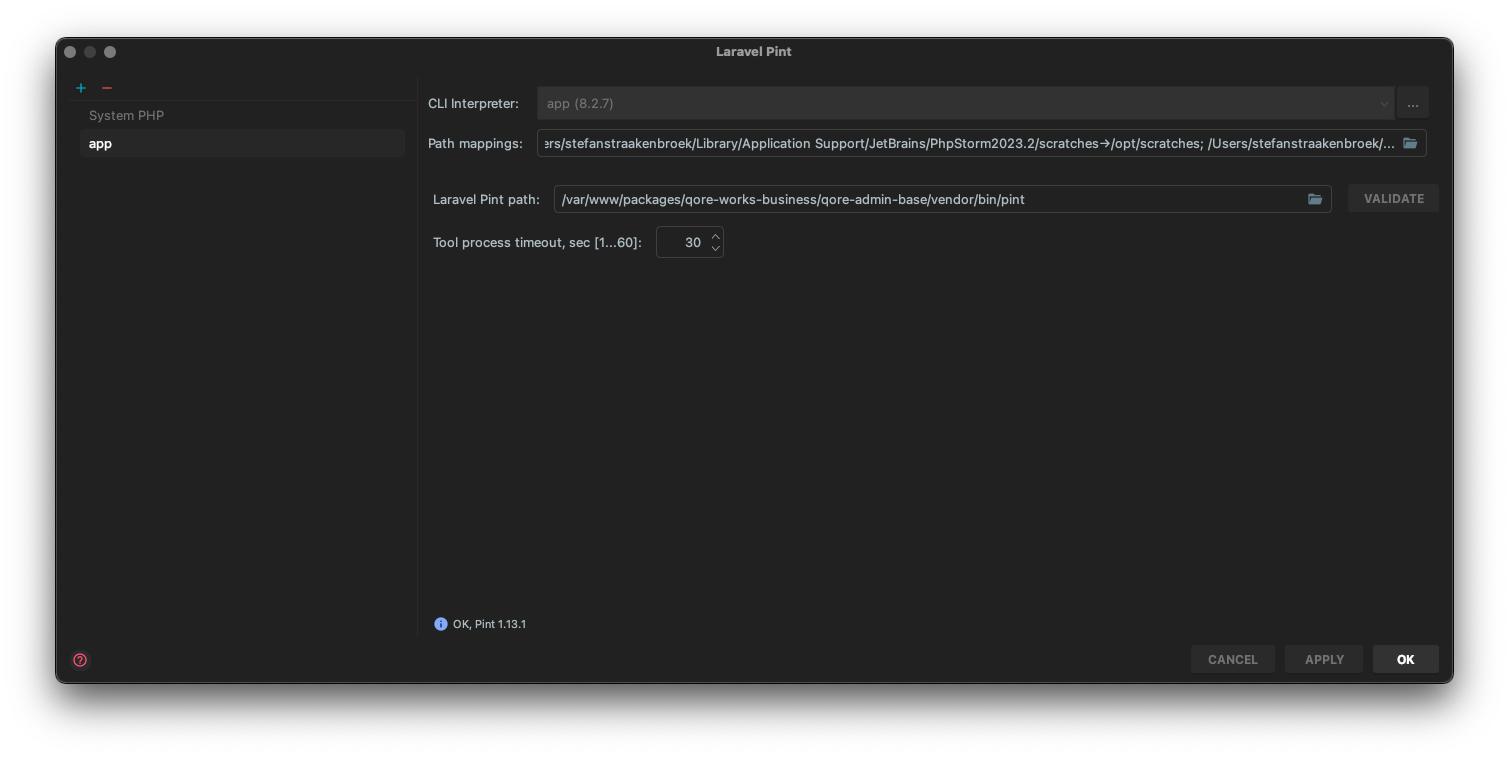
The laravel pint path should be:
/var/www/packages/qore-works-business/qore-admin-base/vendor/bin/pintReleasing
After working on the package, you would like to create a new release so everyone can enjoy your craftsmanship. In your feature branch we need to create a new version. This we can do with the dq command outside your docker. Don't have the dq command? Please look at the readme of dq project tools how to install this on your machine.
Create version (simple)
dq package:versionCreate version (advanced)
dq package:version \'Description of the change you made\' --type=patchPossible type values are: major, minor and patch. After creating an Semversioner file we can add this to your feature branch.
Deploying
It is very easy to deploy a new version. The only thing you have to do, create and merge the development branch to the main branch.
The following actions take place when merging to the main branch:
- Application is build
- Semversioner is creating the correct version number
- Semversioner is updating the CHANGELOG.MD
- Bitbucket is adding the changed file to the release branch
- Bitbucket is tagging the commit with the right version number
- Packagist is fetching the new build so it's available
Branches explained
- development
- Active development to add new functionality for new releases. Branch should be merged to master only.
- master
- This is the active developed branch for the current major release. For example; version v2.x is tagged to the master.
- release/1.x
- This branch is only for legacy support and can have security hotfixes merged to.
Create a new major version
When creating a new major version of the Qore admin or package. That can contain breaking changes. Because we still want to support security hot fixes to the older version, we need to create specif branch where we can release those hotfixes.
- Create release/1.x branch from the master. Where 1.x is the current major version.
- Make sure the
DQ Automationuser has write access to the repository:
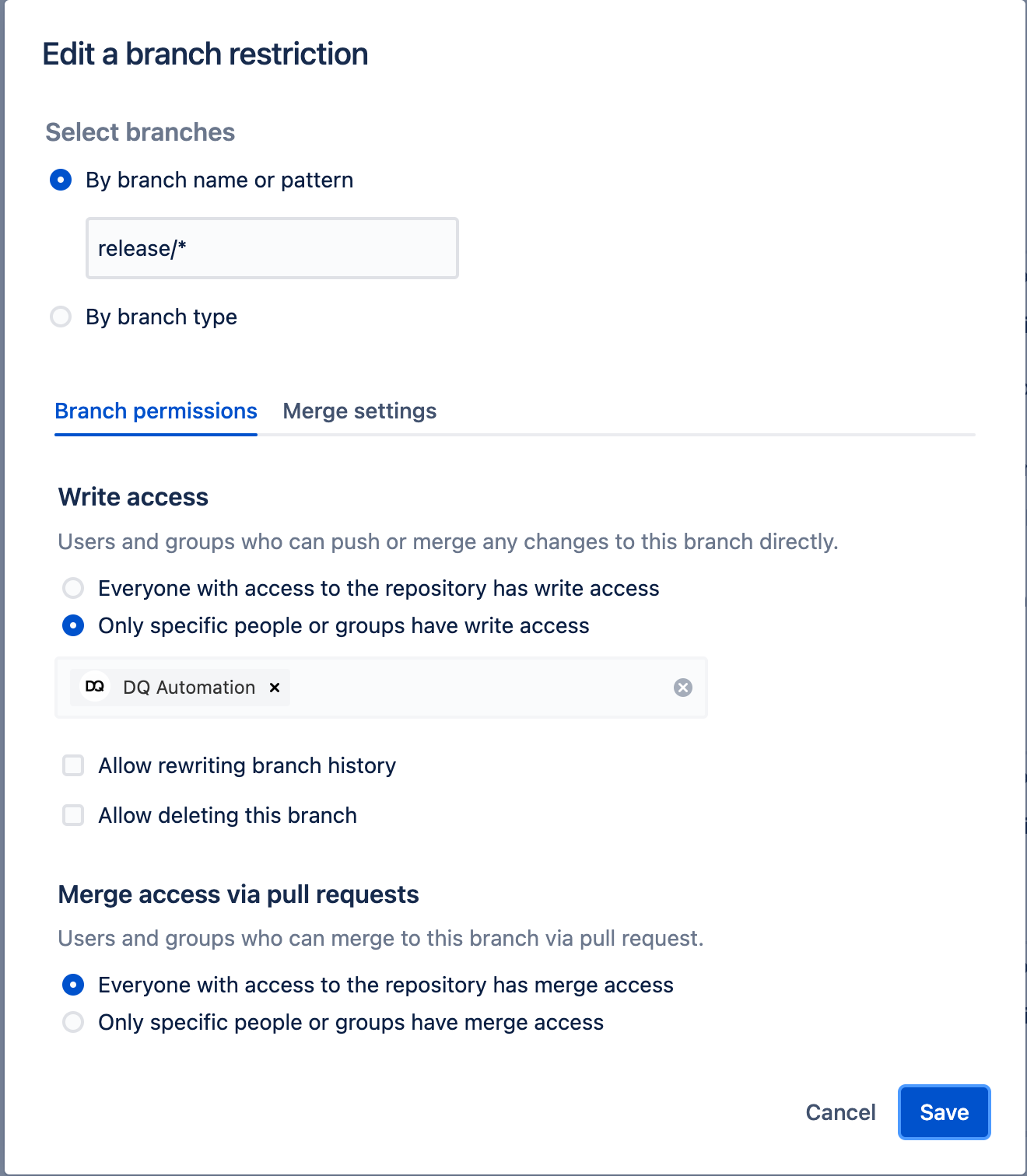
- When you create a new major version with
dq:package:version. The version will be automatically changed on the master when merging the development branch.
Create a new package
Qore.works Business can be extended with packages. The idea is to have several packages that combines functionality. For example; the qore-frontend package will contain a frontend jumpstart, but also the Faq and Asset module to be managed with the backoffice
Create new package
Creating new packages will use the qore-package skeleton repository. Run the following command to create a new package for Qore.works Business:
./localbuild/create_package.shPackage will contain:
- Orchestra:
vendor/bin/testbench - Laravel Pint:
composer format - Pest PHP with MySQL database:
composer test - Larastan:
composer analyse - Pipelines
- Semversioner
- Spatie Laravel package tool
- Pre-commit githooks
- Documentation:
docs/index.md
Permissions
Make sure you also create a default set of permissions for you package if it's needed to be controlled in the backoffice. You can easily create the permissions with actions on your migration. For example:
use QoreWorksBusiness\QoreAdminBase\Actions\CreatePermissionsAction;
use QoreWorksBusiness\QoreAdminBase\Actions\RevokePermissionsAction;
use QoreWorksBusiness\QoreAdminBase\Enums\AssetPermission;

return new class() extends Migration
{
    protected static array $permissions = [
        AssetPermission::VIEW,
        AssetPermission::EDIT,
        AssetPermission::DELETE,
    ];

    public function up(): void
    {
        ...

        CreatePermissionsAction::run(self::$permissions);
    }

    public function down(): void
    {
        ...

        RevokePermissionsAction::run(self::$permissions);
    }
};
Features
If you have certain parts of your package that should be able to be turned off or configured, you can use the PackageFeatures functionality.
Create a src/Features.php file with the following content:
<?php

declare(strict_types=1);

namespace QoreWorksBusiness\YourPackageName;

use QoreWorksBusiness\QoreAdminBase\Services\PackageFeatures;

class Features extends PackageFeatures
{
    public static function configFile(): string
    {
        return 'your_package_config_file';
    }

    public static function rememberMe(): bool
    {
        return self::activated('login.remember_me', default: true);
    }

    public static function emailVerification(bool $config = null): bool
    {
        if (!is_null($config)) {
            config(['your_package_config_file.features.login.email_verification' => $config]);
        }
        return self::activated('login.email_verification', default: false);
    }

    public static function usePersonCityOfBirth(?bool $config = null): bool
    {
        // Shorthand method to the above code sample, to return the activated feature and set the defined config value
        return self::activatedWithSet('person.use_city_of_birth', default: false, value: $config);
    }

    public static function loginMethod(): string
    {
        return self::value('login.method', default: 'password');
    }
}
For example, if you wish to enable or disable the "email verification" feature based on the feature toggle, simply do this:
if (Features::emailVerification()) {
    // Add email verification
}
Users of the package can toggle the "email verification" feature in two ways:
The first method is through a config file.
// config/your_package_config_file.php

declare(strict_types=1);

return [
    'features' => [
        'login' => [
            'email_verification' => true,
        ]
    ]
];
The second method is on-the-fly, using the AppServiceProvider for example:
<?php

namespace App\Providers;

use Illuminate\Support\ServiceProvider;
use QoreWorksBusiness\YourPackageName;

class AppServiceProvider extends ServiceProvider
{
    public function register(): void
    {
        //
    }

    public function boot(): void
    {
        YourPackageName\Features::emailVerification(true);
    }
}